Darknet + YOLO v4 tiny 를 이용한 이미지 학습-1
Darknet + YOLO v4 tiny 를 이용한 이미지 학습-1
0. 확인하고 싶은 것
실제 게임에서 얻은 이미지가 아니라, 만들어진 게임 이미지로도 학습이 되는지?
해상도, 감마, 대비, 확대, 축소 등의 변화에도 오브젝트 인식이 가능한지?
1. 환경 구성
- TBU
2. 학습 데이터 생성
- 게임 내 스크린샷 기능으로 게임 이미지(
Base image) 생성 - 게임 이미지(
Base image)에 게임 아이템 이미지(Game asset)을 추가하여 이미지 생성(Generated image)
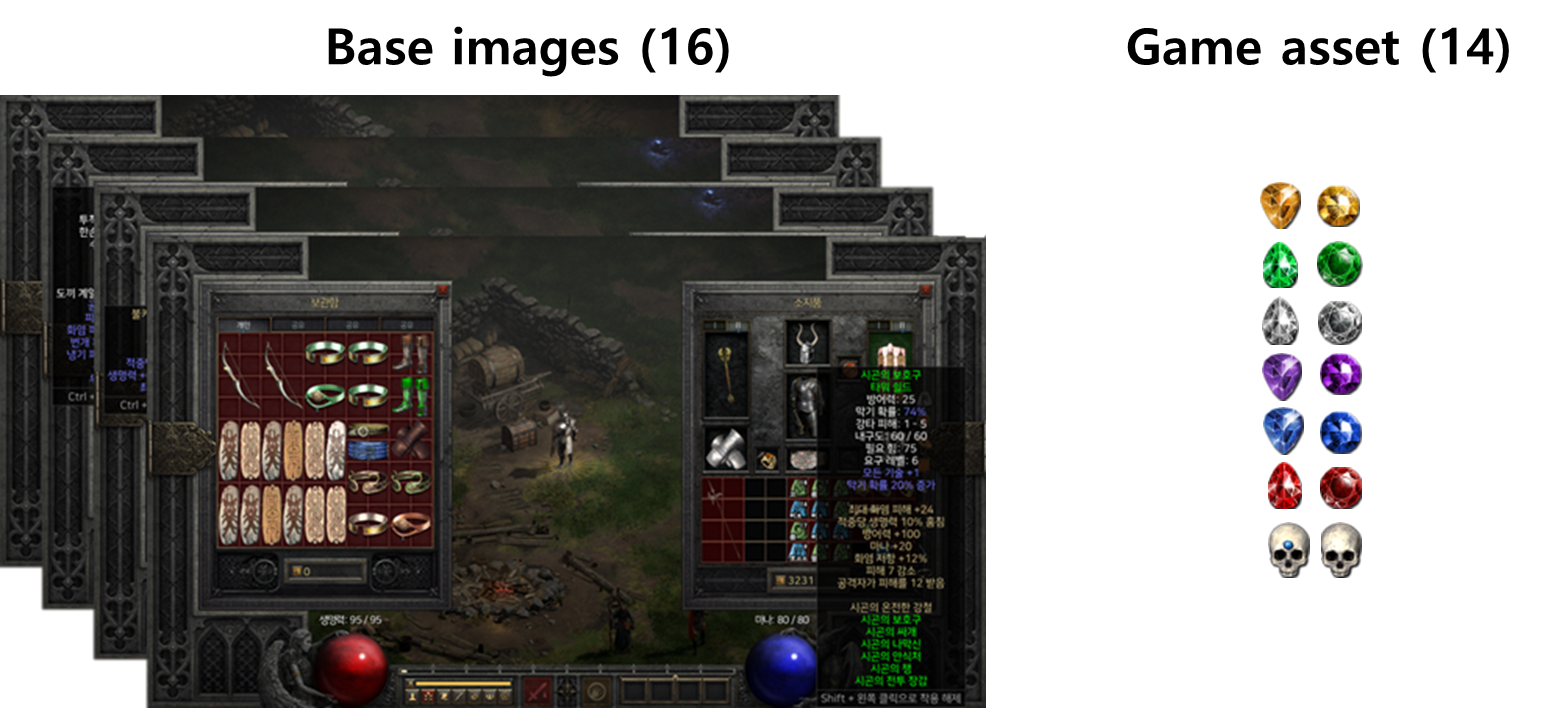
Base images (16장)
해상도 : 1920x1080 / 확장자 : png
- 게임 내 설정 : Act1 마을, 인벤토리가 열린 상태, 닫힌 상태 모두 사용
Game asset (14장)
해상도 : 다양 / 확장자 : png (투명 포함)
- 게임내 설정 : 마우스로 들고 있거나, 인벤토리에 있는 경우 형태 변화 없으므로 따로 고려 X
- 14개 보석 이미지 사용 -> 14 classes
Generated image (80장)
해상도 1920x1080 / 확장자 : jpg
Generated image를 png로 사용하려면, yolov4-tiny-custom.cfg 파일에서 channel수 4로 바꿔줘야 하는 듯?
하나의 Base image에 14개의 Game asset를 class별 랜덤하게 0~10개를 겹치지 않게 추가하였다. (5회 반복)
- 5(반복) * 14
Base image= 80Generated image+ 80YOLO format Coodinates
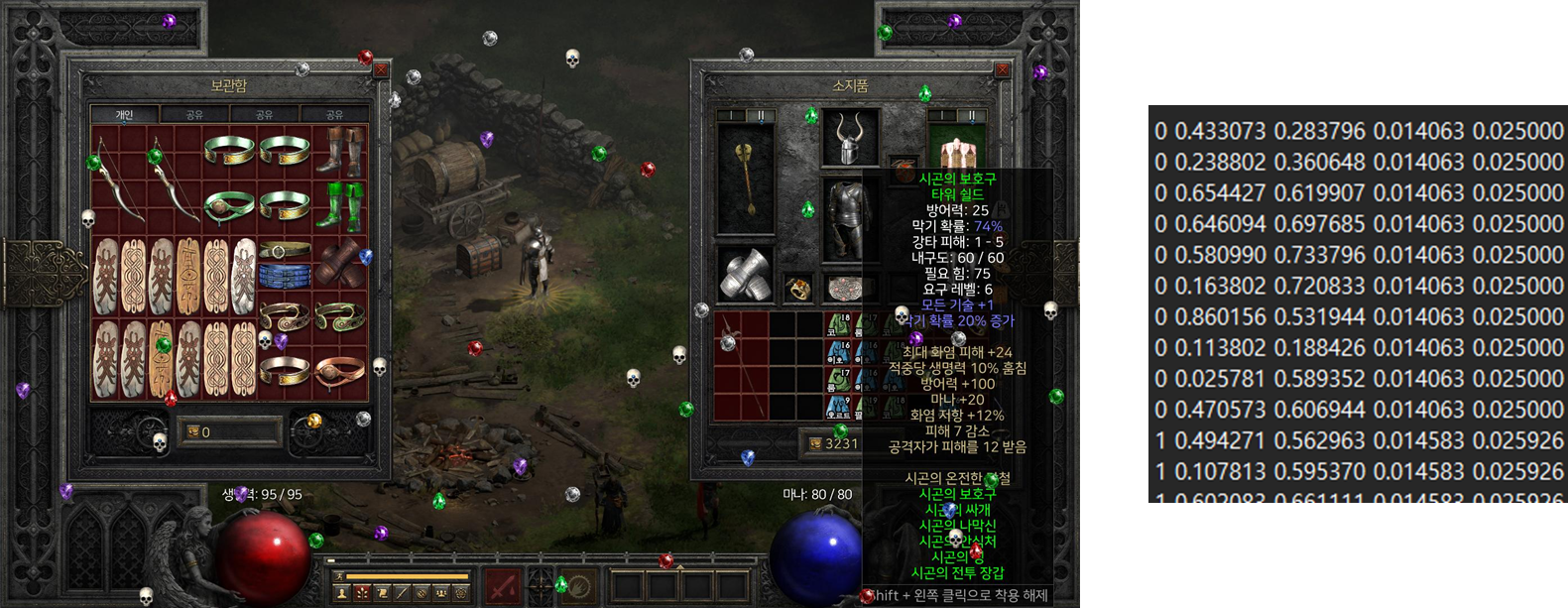
위 내용을 5회 반복하여 80장의 이미지를 생성하여 학습에 사용하였다.
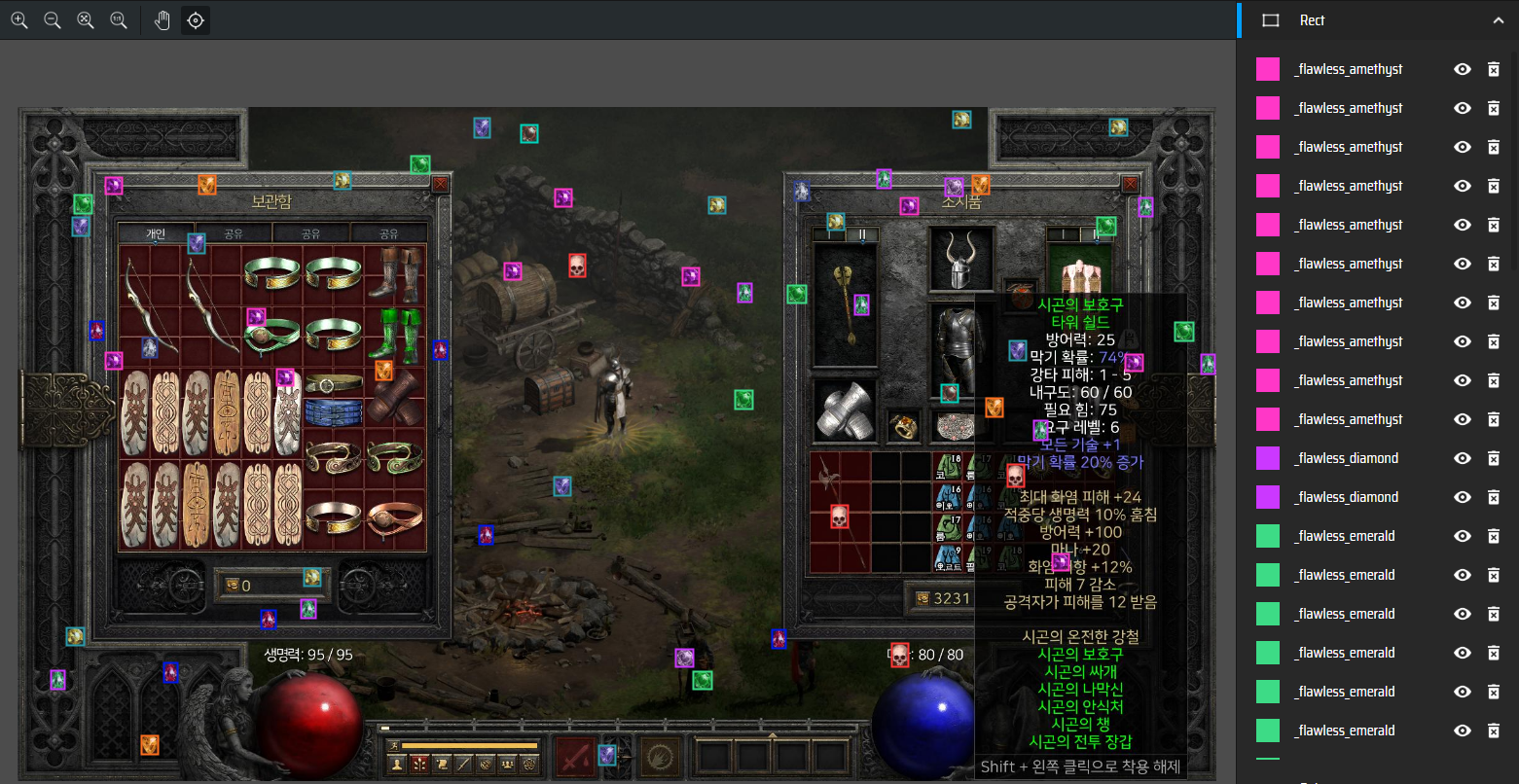
makesense.ai에 Generated image와 YOLO format Coodinates 업로드하면 lebeling 된 내용을 확인 할 수 있다.
2-1. 학습 데이터 생성 코드
2-2. 학습/검증 데이터 분리
- TBU
3. 학습 환경
AMD 5600 + Geforce 3060ti + WLS2 ( No swap mem, RAM 4GB )
14 classes 이므로, batch 14*2000=28000회 수행
1
2
3
4
5
6
7
8
9
10
11
12
13
14
15
16
17
18
19
+-----------------------------------------------------------------------------------------+
| NVIDIA-SMI 550.120                Driver Version: 560.94         CUDA Version: 12.6     |
|-----------------------------------------+------------------------+----------------------+
| GPU  Name                 Persistence-M | Bus-Id          Disp.A | Volatile Uncorr. ECC |
| Fan  Temp   Perf          Pwr:Usage/Cap |           Memory-Usage | GPU-Util  Compute M. |
|                                         |                        |               MIG M. |
|=========================================+========================+======================|
|   0  NVIDIA GeForce RTX 3060 Ti     On  |   00000000:07:00.0  On |                  N/A |
|  0%   37C    P8             18W /  200W |    1811MiB /   8192MiB |      2%      Default |
|                                         |                        |                  N/A |
+-----------------------------------------+------------------------+----------------------+

+-----------------------------------------------------------------------------------------+
| Processes:                                                                              |
|  GPU   GI   CI        PID   Type   Process name                              GPU Memory |
|        ID   ID                                                               Usage      |
|=========================================================================================|
|  No running processes found                                                             |
+-----------------------------------------------------------------------------------------+
4. 학습 (darknet + YOLO v4 tiny)
1
2
3
4
5
6
7
./darknet detector train \
data/obj.data \
cfg/yolov4-tiny-custom.cfg \
yolov4-tiny.conv.29 \
-map \
-dont_show \
2>/dev/null
mAP으로 best weight 를 계산해주므로, -map 옵션은 넣는것이 좋다.
stderr로 출력되는 내용이 많으므로, 2>/dev/null 으로 조절하는 것이 좋다.
학습은 10시간 가량 걸렸다.
학습 완료 로그
1
2
3
4
5
6
7
8
9
10
11
12
13
14
15
16
17
18
19
20
21
22
23
24
25
26
27
28
29
30
31
32
...
생략
...
 detections_count = 597, unique_truth_count = 564
class_id = 0, name = _flawless_amethyst, ap = 91.90%     (TP = 29, FP = 2)
class_id = 1, name = _flawless_diamond, ap = 85.16%      (TP = 30, FP = 4)
class_id = 2, name = _flawless_emerald, ap = 99.95%      (TP = 45, FP = 1)
class_id = 3, name = _flawless_ruby, ap = 89.58%         (TP = 48, FP = 5)
class_id = 4, name = _flawless_saphire, ap = 94.67%      (TP = 32, FP = 1)
class_id = 5, name = _flawless_skull, ap = 97.57%        (TP = 41, FP = 2)
class_id = 6, name = _flawless_topaz, ap = 100.00%       (TP = 41, FP = 0)
class_id = 7, name = _perfect_amethyst, ap = 92.10%      (TP = 45, FP = 3)
class_id = 8, name = _perfect_diamond, ap = 96.79%       (TP = 46, FP = 3)
class_id = 9, name = _perfect_emerald, ap = 90.44%       (TP = 35, FP = 3)
class_id = 10, name = _perfect_ruby, ap = 90.56%         (TP = 22, FP = 2)
class_id = 11, name = _perfect_saphire, ap = 93.84%      (TP = 31, FP = 2)
class_id = 12, name = _perfect_skull, ap = 97.40%        (TP = 49, FP = 1)
class_id = 13, name = _perfect_topaz, ap = 92.50%        (TP = 38, FP = 2)

 for conf_thresh = 0.25, precision = 0.94, recall = 0.94, F1-score = 0.94
 for conf_thresh = 0.25, TP = 532, FP = 31, FN = 32, average IoU = 83.69 %

 IoU threshold = 50 %, used Area-Under-Curve for each unique Recall
 mean average precision (mAP@0.50) = 0.937475, or 93.75 %

Set -points flag:
 `-points 101` for MS COCO
 `-points 11` for PascalVOC 2007 (uncomment `difficult` in voc.data)
 `-points 0` (AUC) for ImageNet, PascalVOC 2010-2012, your custom dataset

 mean_average_precision (mAP@0.50) = 0.937475
If you want to train from the beginning, then use flag in the end of training command: -clear
batch 별 mAP 변화
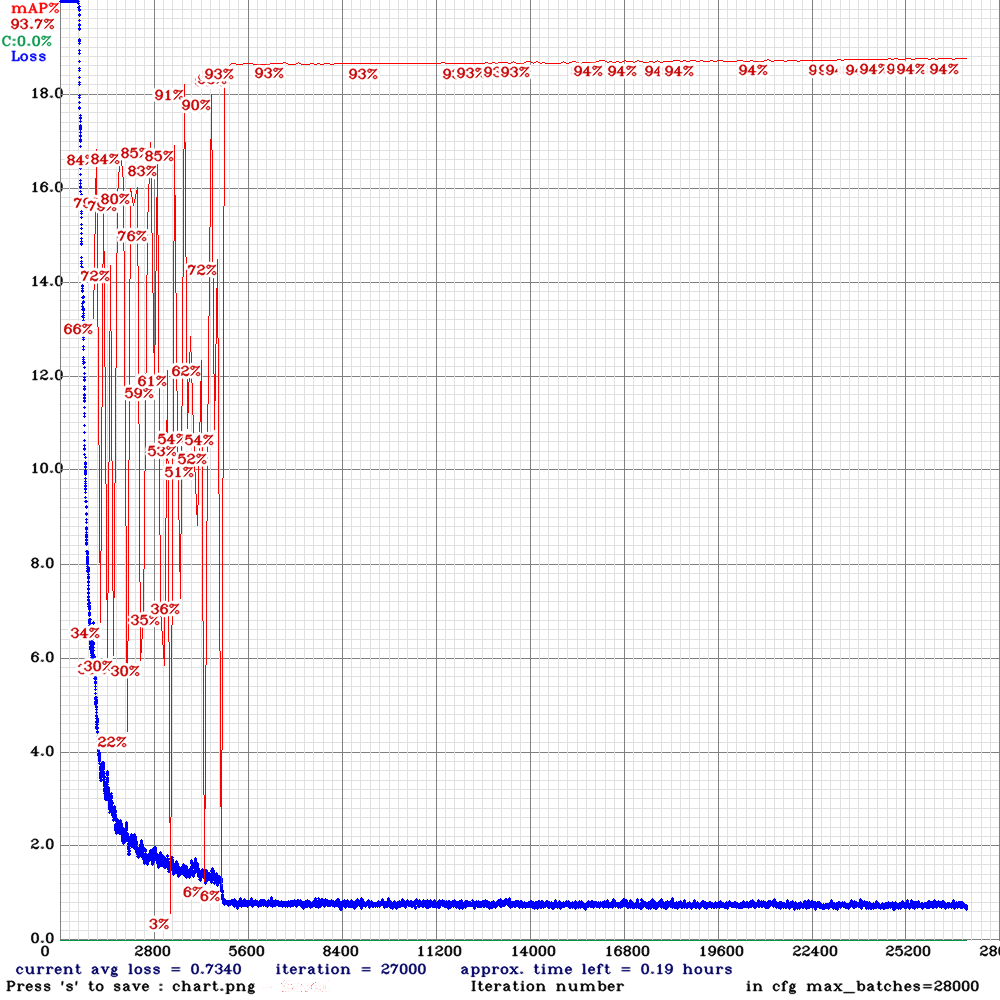
5. reference
This post is licensed under CC BY 4.0 by the author.